

Athletic Development Timer
The interval timer built by a coach, for coaches, teams and athletes.
For iPhone and iPad · Free, with a one-off Pro upgrade · No adverts
Made for real training
Created by Al Stewart, a strength and conditioning coach with over 20 years in elite sport. Designed to be used on the pitch, in the gym and on the track, where you need to see and hear the timer from across the room.
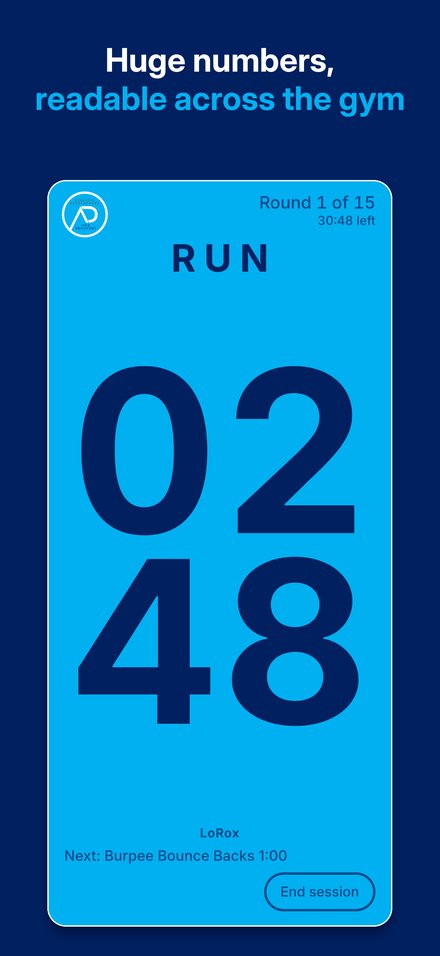
- Huge numbers that fill the screen, in portrait or landscape
- Full-screen colour for work and rest, with the next colour rising in the last 3 seconds
- Beeps, and every exercise called out in Al's own voice, over your own music
- Keeps running with the screen locked or in another app
- Longer rest or skip a rest mid-session, and the rest of the session adjusts
- No account, no adverts, no data collected
Pro, one payment, yours for good
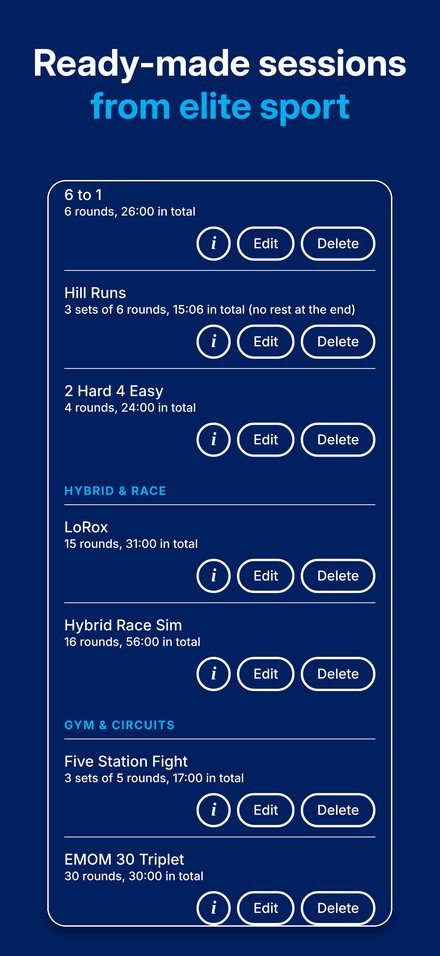
- Ready-made sessions from elite sport: running intervals, hybrid race, gym circuits and fight rounds
- Save your own sessions and start them in one tap
- Different work and rest for every round, with named exercises
- Sets, with a separate rest between them
Help
I can't hear the beeps or the voice
Turn the volume up with the buttons on the side of your device, and check it isn't connected to Bluetooth headphones or a speaker you're not using. Open Settings in the app (the cog) and tap Test sound. If you're playing music, the timer plays over it.
Does it work with the screen locked?
Yes. Once a session is running you can lock the screen or switch to another app, and the beeps and voice carry on. Open the app again to see the countdown.
Whose voice is it?
Al's. Every built-in exercise and call is recorded by him. Names you type in yourself are read by your device's own voice. For a more natural device voice, go to Settings, then Accessibility, then Spoken Content, then Voices, then English, and download an Enhanced or Premium UK voice.
I bought Pro but it's locked on my new device
Open Settings in the app (the cog) and tap Restore purchase, using the same Apple account you bought it with. Pro is a one-off purchase that works on all your devices.
What's the difference between rounds and sets?
A round is one block of work followed by its rest. A set is a group of rounds. For example, 3 sets of 6 rounds of 20 seconds on and 20 seconds off, with 90 seconds between sets. The set rest replaces the last short rest of each set.
How do I name an exercise?
Tap "+ Name it" above the work time and pick from over 100 exercises, or type your own. Rests can be named too, for example Walk or Active Recovery. The name shows on screen and is spoken at the start.
Can I edit or delete the ready-made sessions?
Yes. In Saved, tap Edit to change a session, or Delete to remove it. Tap the i to read what a session is and how to approach it.
Support and feedback
Found a problem, or have an idea for the timer? Email and we'll get back to you.